
How sip-and-puff computer mice expand hands-free access today
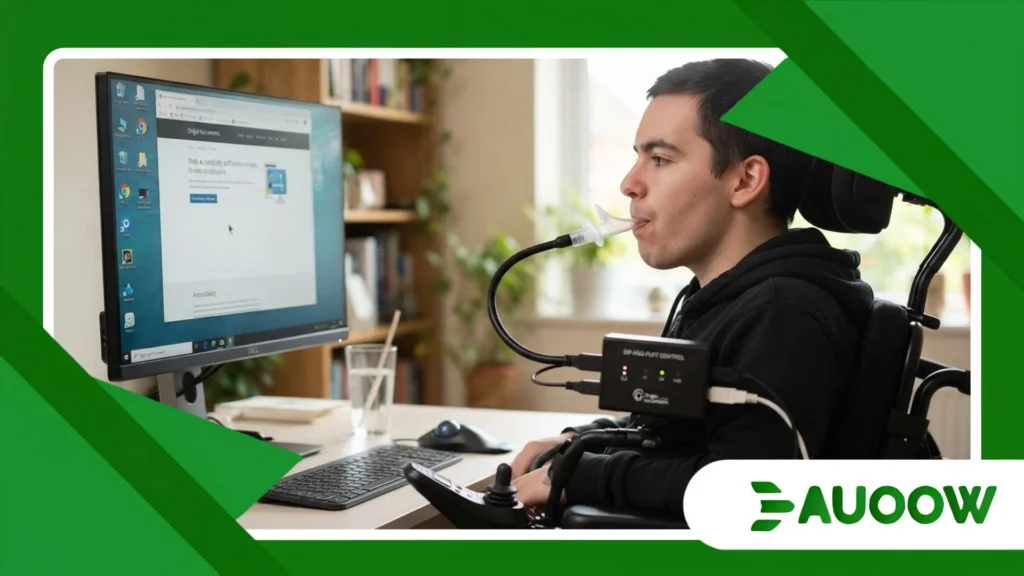
At 8:45 AM in a quiet home office outside Chicago, Marcus checks his morning emails before his first team stand-up, relying entirely on sip-and-puff computer mice to navigate a dense spreadsheet without lifting a finger.
A soft inhale clicks a cell; a steady exhale scrolls down the column. There is no dramatic fanfare in the room, only the faint, rhythmic sound of breath translating directly into digital agency.
For millions of people living with high-level spinal cord injuries, amyotrophic lateral sclerosis (ALS), cerebral palsy, or muscular dystrophy, the standard keyboard and optical mouse represent an invisible wall.
When modern workplaces, banking portals, and civic services assume two functional hands as the baseline for participation, hardware becomes the gatekeeper of citizenship.
Pneumatic input devices dismantle that barrier through a remarkably straightforward mechanism: air pressure.
What we will explore in this piece:
- How pneumatic air-pressure sensors translate subtle breaths into precise cursor movements and clicks.
- Why historical disability legislation like Section 508 still shapes contemporary hardware compatibility.
- The structural and financial barriers that keep assistive interfaces out of reach for low-income users.
- How breath-controlled peripherals compare against eye-tracking and voice-dictation systems in daily workflows.
- What policy shifts and open-hardware initiatives mean for the future of hands-free computing.
Why Does a Simple Breath-Controlled Interface Still Matter?

In a tech landscape obsessed with brain-computer interfaces and predictive artificial intelligence, a plastic tube connected to a pressure transducer can look deceptively low-tech.
Yet reliability often beats novelty when your livelihood depends on an unbroken connection to your screen.
What rarely enters this debate is the sheer cognitive and physical fatigue caused by newer hands-free alternatives.
Voice recognition software struggles in noisy open offices, falters with dysarthric speech, and becomes exhausting over an eight-hour workday.
Eye-tracking cameras, while transformative for many, demand strict lighting conditions and can cause severe ocular strain after prolonged focus.
When we look more closely, the pattern repeats itself across assistive technology history: the most durable tools are those that respect human physiology rather than forcing the body to adapt to fragile sensors.
A pneumatic switch requires minimal muscular effort, works in total darkness, and operates silently during video calls or quiet study sessions.
How Do Pneumatic Sensors Translate Breath into Cursor Precision?
Inside the control box of modern sip-and-puff computer mice, dual-threshold pressure transducers measure tiny changes in positive and negative air pressure.
A gentle sip triggers a left-click, while a firmer inhale might execute a double-click or activate a drag-lock function.
Conversely, a soft puff registers as a right-click, and a sustained breath can toggle between cursor movement and scrolling modes.
Recent iterations have paired these pneumatic switches with subtle head-tracking gyroscopes or lip-operated joysticks.
This hybrid design allows a user to steer the pointer smoothly across dual monitors with micro-movements of the chin or head while executing rapid, zero-latency clicks with their breath.
++ Adaptive Driving Technologies Worth Watching
Where Do Standard Operating Systems Fall Short?
Despite plug-and-play USB compatibility, operating systems rarely treat pneumatic inputs as first-class citizens out of the box.
Users frequently encounter web interfaces with tiny click targets, hover-dependent drop-down menus, and aggressive session timeouts that penalize slower navigation speeds.
There is a structural detail that usually goes ignored in software design: digital accessibility guidelines like the Web Content Accessibility Guidelines (WCAG) heavily emphasize keyboard-only navigation, yet breath-driven pointer users sit in a hybrid space.
When a website breaks standard pointer focus or hijacks right-click context menus, it inadvertently disables the exact commands a pneumatic user relies upon.
How Did Past Disability Policies Shape Hands-Free Hardware?
To understand why breath-controlled peripherals exist in their current form, we have to trace a line back to the rehabilitation engineering movements of the 1960s and 1970s.
Originally developed to help quadriplegic patients operate motorized wheelchairs and environmental control units, pneumatic switches proved that minimal residual motor control could unlock complex mechanical autonomy.
The legal turning point arrived in the United States with the Rehabilitation Act of 1973 and its subsequent 1998 amendment, Section 508, which mandated that federal agencies make their electronic and information technology accessible.
Combined with the Americans with Disabilities Act (ADA) of 1990 and the Twenty-First Century Communications and Video Accessibility Act (CVAA) of 2010, these frameworks established a critical precedent: access to digital tools is a civil right, not a charitable accommodation.
In my reading of this landscape, legislation forced operating system developers to build native switch-control APIs into Windows, macOS, and iOS.
Without those regulatory guardrails, sip-and-puff computer mice would have remained trapped as expensive, proprietary medical equipment incompatible with mainstream software updates.
Who Gets Left Behind When Assistive Hardware Is Treated as a Luxury?
Walk into any corporate IT procurement office, and you can order an ergonomic vertical mouse for eighty dollars with next-day shipping.
Try acquiring a medical-grade pneumatic mouse system, and you will likely confront a price tag ranging from $400 to over $1,200, accompanied by weeks of insurance paperwork.
Consider a qualified paralegal with a C4 spinal cord injury applying for a remote contract role. Even when the employer agrees to provide reasonable accommodations under the ADA, procurement delays and unfamiliarity with assistive vendors can stall onboarding for months.
Meanwhile, freelancers, gig workers, and students in underfunded school districts often fall through the cracks entirely, forced to crowdfund basic input devices that nondisabled peers take for granted.
The most honest analysis suggests that market size alone does not explain these inflated costs.
Rather, fragmented reimbursement rules under Medicare, Medicaid, and private insurers classify communication and computer-access tools inconsistently sometimes as durable medical equipment, other times as non-essential vocational aids.
Also read: Why facial recognition accessibility raises daily access concerns
Can Open-Source Hardware Close the Affordability Gap?
Over the past decade, grassroots initiatives like the Makers Making Change network and the Open Assistive community have begun challenging proprietary pricing models.
By publishing open-source schematics using off-the-shelf microcontrollers and low-cost barometric pressure sensors, volunteer engineers have brought the material cost of basic pneumatic switches down to under fifty dollars.
There are good reasons to question whether DIY hardware can fully replace commercial clinical devices, particularly when hygiene, FDA compliance, and technical support are on the line.
However, open-source designs have undeniably pressured legacy manufacturers to improve customization, offer replaceable antimicrobial mouthpieces, and simplify software calibration.
Read more: The rise of smart crosswalk accessibility in urban mobility plans
How Do Hands-Free Input Technologies Compare in Daily Use?
Choosing an assistive input method is rarely about finding a single “best” device; it is about matching hardware to a person’s changing energy levels, environment, and daily tasks.
Many experienced users rotate between tools throughout the day to prevent repetitive strain or vocal fatigue.
| Input Method | Primary Mechanism | Key Strengths | Main Limitations | Typical Cost Range (USD) |
| Sip-and-Puff Computer Mice | Positive/negative air pressure via mouthpiece + optional head/lip sensor | Silent operation, unaffected by lighting/noise, low physical fatigue, fast click response | Requires regular tube sanitation; learning curve for multi-pressure thresholds | $50 (DIY/Open) – $1,100 (Commercial) |
| Optical Eye-Tracking | Infrared cameras tracking pupil reflection and gaze dwell time | Completely touchless, requires zero head or breath control | High cost, sensitive to sunlight/glasses, causes eye fatigue over long sessions | $1,000 – $6,000+ |
| Voice Dictation & Control | Acoustic speech recognition + command macros | Fast text entry, built into major operating systems at no extra cost | Fails in noisy spaces, tiring for all-day use, challenging with speech impairments | $0 (Built-in) – $500 (Pro software) |
| Head-Tracking Cameras | Webcam or reflective dot tracking head tilt and rotation | Intuitive cursor steering, minimal hardware footprint | Requires external switch or dwell-clicking software to execute clicks | $0 (Software) – $800 (Dedicated IR) |
Where Does Breath-Controlled Computing Go From Here?
When we step back and examine the trajectory of sip-and-puff computer mice, the real story is not merely about clever pressure sensors or sleeker tubing.
It is about how society defines the baseline user when building the digital public square.
Every checkout form, remote classroom portal, and cloud workspace either quietly welcomes non-traditional input methods or shuts them out through thoughtless interface friction.
True digital inclusion happens when assistive peripherals cease to be treated as exotic medical exceptions and are recognized instead as standard human-computer interfaces.
As hybrid work and AI-assisted workflows reshape white-collar and creative industries, pairing breath-controlled navigation with smart predictive shortcuts could allow users with severe motor disabilities to work faster and with less physical strain than ever before.
Yet technology alone will never bridge the divide if procurement policies, insurance coverage, and web accessibility standards lag behind hardware innovation.
Expanding hands-free access requires treating devices like sip-and-puff computer mice as essential infrastructure just as fundamental to equal participation as a wheelchair ramp at the front door of a public library.
Frequently Asked Questions
How do sip-and-puff computer mice actually work without using hands?
These devices use a sterile, flexible tube connected to an electronic pressure sensor.
When you gently inhale (sip) or exhale (puff) into the tube, the sensor detects subtle shifts in air pressure and converts them into standard mouse clicks, scrolls, or keyboard shortcuts.
Many models pair this breath switch with a lip-controlled joystick or head-tracking sensor to move the cursor across the screen.
Are sip-and-puff devices hygienic and safe for everyday use?
Yes, provided they are maintained properly.
Most commercial systems include disposable hydrophobic filters that block moisture and bacteria from entering the internal electronics, along with replaceable plastic mouthpieces and tubing that can be washed daily with mild soap or replaced every few weeks.
Can you use a sip-and-puff mouse with a Mac, iPad, or standard Windows PC?
Most modern pneumatic mice connect via standard USB or Bluetooth and are recognized automatically as generic Human Interface Devices (HID).
This means they work natively on Windows, macOS, Linux, ChromeOS, and even iPads or Android tablets without needing complex custom drivers.
Who benefits most from breath-controlled computer access?
They are most commonly used by individuals with high-level spinal cord injuries (such as C1 to C4 quadriplegia), advanced muscular dystrophy, multiple sclerosis, ALS, or cerebral palsy.
They also serve people experiencing temporary upper-limb immobilization or severe repetitive strain injuries who need a reliable, voice-free way to operate a computer.
Does health insurance or Medicare cover the cost of a sip-and-puff mouse?
Coverage depends heavily on how the device is classified and your specific policy.
In the United States, Medicaid waivers, state vocational rehabilitation agencies, and Veterans Affairs (VA) programs frequently fund computer-access equipment if a clinician documents it as medically or vocationally necessary.
Standard private insurance and Medicare can be stricter, often requiring prior authorization proving the device is essential for communication or daily living.
